Restaurants
A restaurant pre-order form that fills itself in
Swap the PDF, email or online form for one link. Each guest makes their menu choices on their phone, sees the allergens on every dish and declares allergies by name.
Most restaurants already have an order form for groups of some kind: a PDF the organiser prints and fills in, a table in an email, or a general-purpose online form. They all have the same weakness. One person collects everyone's answers, then someone at the restaurant types them up again.
PreOrderly turns the form into a PreOrder. Each guest fills in their own part, the answers go straight into your kitchen sheets, and nobody has to retype a thing.
How it works
Three steps
- 01
Bring your menu across
Import your dishes and allergens from our spreadsheet template, or build it in the menu editor.
- 02
Send one link instead of a form
Create a PreOrder for the booking. The organiser shares the join link and each guest chooses for themselves.
- 03
Print the results, not the form
Choices flow into the prep list, allergy list and service sheets. Changes before the deadline update them automatically.
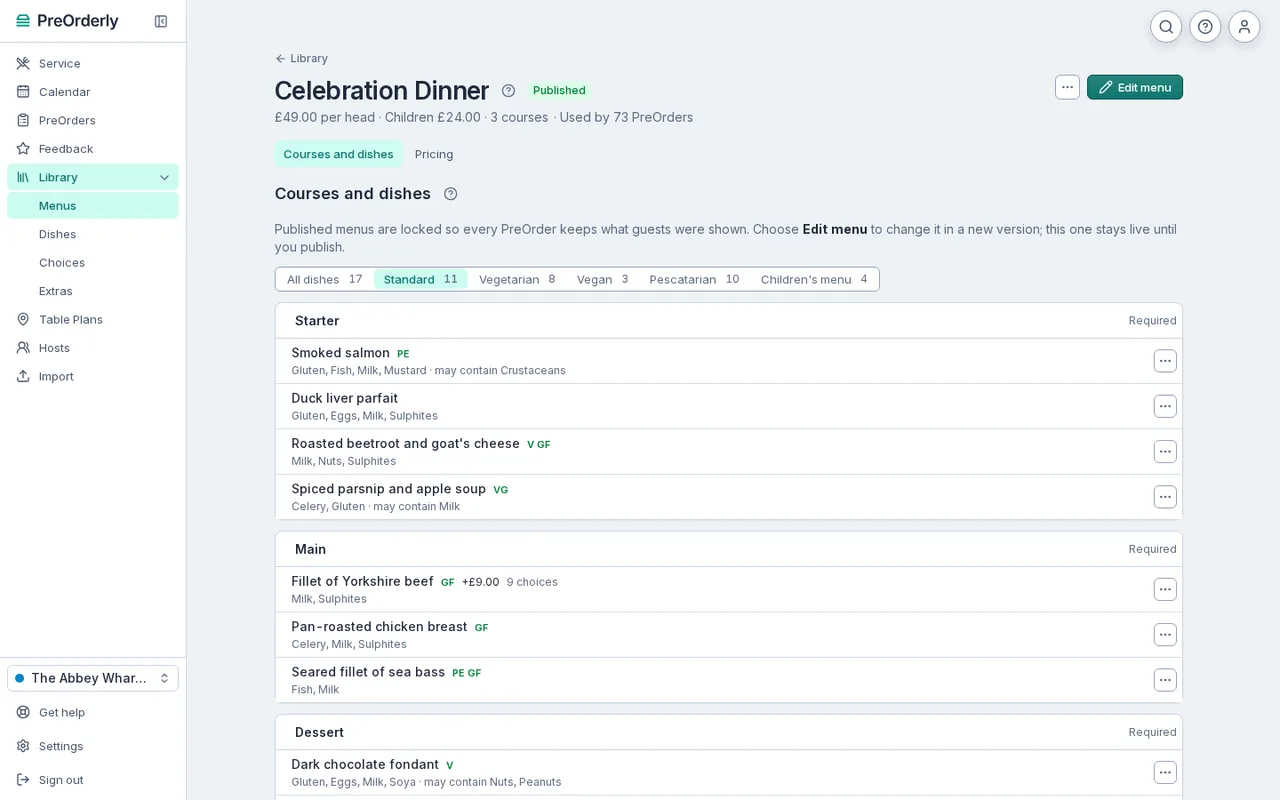
Courses, dietary menus and the allergens each dish contains, ready to send.
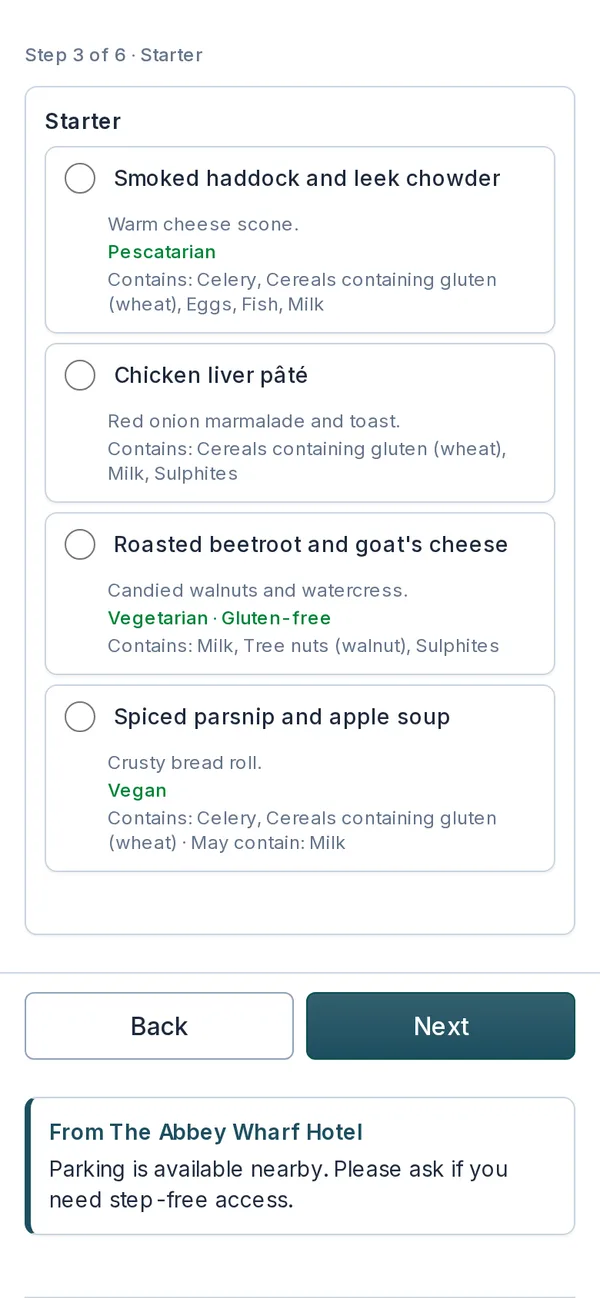
What a guest sees: one course at a time, with allergens on every dish.
Why a form is not enough
A general-purpose form can collect answers, but it does not know anything about your menu or your kitchen. PreOrderly does:
- Guests only see dishes you actually serve, grouped by course, with allergens and may contain shown on each one.
- Anyone who declared an allergen is warned about dishes that list it or may contain it.
- Answers are counted for you: totals by dish for each booking, ready for the kitchen.
- Deadlines, reminders and deposits are built in, so the form is not the end of the job.
Still want something on paper?
Some organisers prefer paper, and some bookings are too small to be worth a link. Our free printable form and spreadsheet template are on the resources page, with no email needed. When the paper version gets too much, the same columns map straight across to a PreOrder.
What changes for your team
Instead of chasing one organiser for a completed form, your team watches the PreOrder fill up. Needs attention lists the guests who have not chosen, deposits still due and allergy declarations to review, each with a one-click fix. Reminders go out automatically before the deadline. When a guest rings with a change, staff edit it on the Guests tab, and the kitchen sheets pick it up. The form becomes something you check, not something you type up.
Plans and fees are explained on the pricing page. 30 days free, extended to your first event (up to 60 days).
Free resources
Christmas party pre-order form
Free to download, no email needed.
Get the template
Can guests change their choices after submitting?
Yes, until your Choices due date. After that, your team can still make changes for them.
Can we show prices on the form?
Yes. A menu can have a set price per head, a price on each dish or a price by the number of courses.
Do we need to retype our menu?
No. You can import dishes, allergens and choices from our spreadsheet template on the Import page, and check them before saving.
Is there a free version of the form?
Our printable form and spreadsheet template are free to download on the resources page. PreOrderly itself has a 30-day free trial: nothing is charged until it ends, and you can cancel any time.
Your next big table, sorted before it arrives.
Set up your menu and send your first PreOrder today.
30 days free, extended to your first event (up to 60 days) · No contract